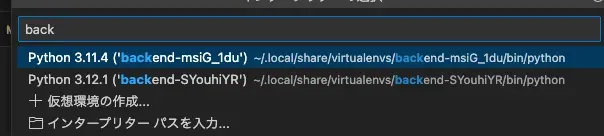
When you create a virtual environment locally, the environment is created based on the directory name. So when I used my usual directory naming, virtual environments with the same name got created, and I couldn’t tell which environment was which.
I looked it up and found a way to change the name of the virtual environment.
PIPENV_CUSTOM_VENV_NAME = custom-envnameBy defining PIPENV_CUSTOM_VENV_NAME in .env, you can make the virtual environment’s name <PIPENV_CUSTOM_VENV_NAME>-<HASH>.
If you put something like the project name in PIPENV_CUSTOM_VENV_NAME, you won’t get confused 🪿
References
Virtual Environments — pipenv 2026.8.0 documentation