Fixing the can't find node.js binary "deno": path does not exist. Error in VSCode
 Full text
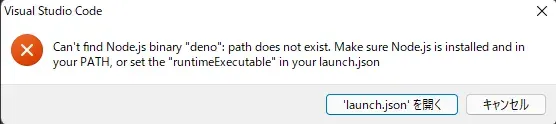
can't find node.js binary "deno": path does not exist. Make sure Node.js is installed and in your PATH, or set the "runtimeExecutable" in your launch.jsonThe Problem
deno is installed and deno -V returns the version, but "runtimeExecutable": "deno" complains that the PATH doesn’t exist.
Environment
os: windows 11 version: 21H2
Procedure
First, confirm it’s installed
deno -V
> deno 1.18.2
Check where deno is installed
where.exe deno
> C:\Users\<username>\.deno\bin\deno.exe
Go back to VSCode and open launch.json
{
    "version": "0.2.0",
    "configurations": [
        {
            "request": "launch",
            "name": "main.ts",
            "type": "pwa-node",
            "program": "${workspaceFolder}/main.ts",
            "cwd": "${workspaceFolder}",
            // Write the path you just checked, doubling up the backslashes
            "runtimeExecutable": "C:\\Users\\<username>\\.deno\\bin\\deno.exe",
            "runtimeArgs": [
                "run",
                "--inspect",
                "--allow-read",
                "--allow-net"
            ],
            "attachSimplePort": 9229
        }
    ]
}
This fixed it.